Stay on Top of Updating Citrix Workspace App

Consistently updating Citrix Workspace App is critical for maintaining a secure, efficient, and future-ready IT environment. Regular updates deliver essential security patches that mitigate emerging threats, ensuring compliance with industry standards and safeguarding sensitive data. Beyond security, updates optimise performance and compatibility with evolving operating systems and enterprise applications, reducing the risk of downtime and user disruption.
By staying current, IT teams also unlock new features and enhancements that improve user experience and productivity, aligning technology capabilities with organisational goals. In short, proactive maintenance of Citrix Workspace is not just best practice, it is a strategic imperative for resilience and operational excellence.
Below is a simple, practical guide to help IT teams and end users stay in control of Workspace app updates with ease.
Step to update Citrix Workspace Apps
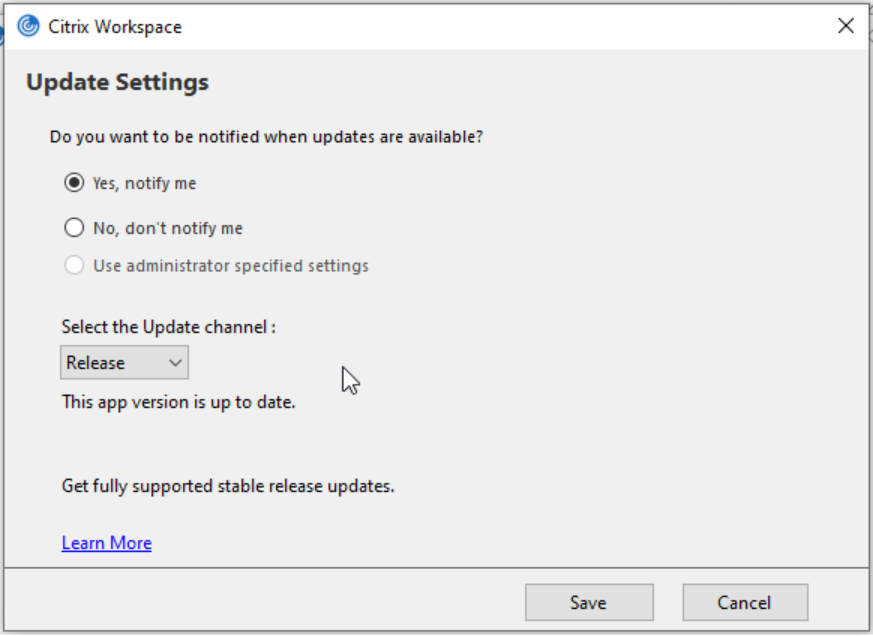
1. Update Tracks
Citrix Workspace app offers different update tracks Current Release (CR) and Long-Term Service Release (LTSR).
- CR delivers the newest features more frequently.
- LTSR focuses on long-term stability with fewer changes.
Choose the channel that best fits your environment and risk tolerance. https://support.citrix.com/support-home/kbsearch/article?articleNumber=CTX205549
2. Automatic Updates
The Workspace app includes built-in auto-update. Enabling it ensures users always receive the latest fixes and enhancements. However, in larger or controlled environments, you may want to disable auto-updates and manage versions centrally instead. This prevents unexpected changes and helps with compatibility testing. https://docs.citrix.com/en-us/citrix-workspace-app-for-windows/updates.html
3. Centralise Management using Group Policies
For Windows environments, Group Policy Objects (GPOs) makes update management simple. You can:
- Disable or enable auto-updates
- Specify update channels
- Control notifications
Centralised policies help maintain consistency across all devices.
4. Always Test Before You Roll Out
Before pushing updates organisation-wide, test new versions in a controlled setting.
Check for:
- App compatibility
- Performance issues
- User experience changes
*Note: a small pilot group can reveal issues before they affect the entire company.
5. Review Citrix Release Notes
Citrix publishes detailed release notes for each version. Reviewing them helps you:
- Identify critical security patches
- Understand new features
- Plan update timing
Staying informed lets you anticipate changes rather than react to them.
https://docs.citrix.com/en-us/citrix-workspace-app-for-windows/whats-new
6. Plan your Update Cycle
Avoid letting Workspace app versions fall too far behind. Outdated versions can lead to performance issues or loss of support. A quarterly or semi-annual update schedule works well in most environments.
Updating Citrix Workspace App isn’t complicated
Managing Citrix Workspace app updates doesn’t have to be complicated. With clear policies, smart testing, and consistent monitoring, you can maintain a secure and stable environment all while minimising disruptions for users.
Have questions or insights to share? mail us at asktheexpert@enterprise-solutions.ie, and chat to our team of Citrix experts to discuss how these features can benefit your organisation.
Stay tuned for more updates!
Reference links
- https://docs.citrix.com/en-us/citrix-workspace-app-for-windows/whats-new
- https://docs.citrix.com/en-us/citrix-workspace-app-for-windows/updates.html
- https://support.citrix.com/support-home/kbsearch/article?articleNumber=CTX205549

Ulrich is an experienced Solutions Engineer, with over two decades of experience across numerous industries. Ulrich supports clients deliver best in class EUC environments through his deep understanding of customers’ requirements and needs.