Most companies that hope to be in
business for the next 10 years have at least considered moving to the cloud. In fact, more than half of them
will make their files and emails cloud-based by the end of this year[1].
They’ve seen how the cloud is helping
small, agile companies disrupt markets
and grow at breakneck speed. They’ve also heard the stories about enhanced
collaboration, IT savings, and the many security benefits the cloud offers.
Like many companies, you might be harboring a nagging feeling
that you should just get going, but knowing where to start can be the problem.
Thankfully,
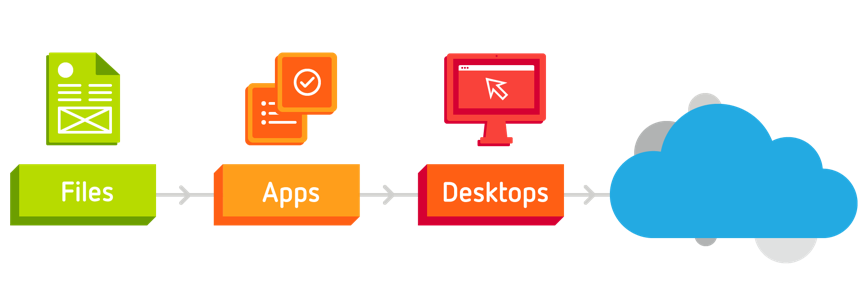
there’s a simple three-step path that many companies use
when they move to the cloud. It goes something like this:
- Move your files to the cloud.
- Move your applications to the cloud.
- Move your desktops to the cloud.
Step 1: Move your files to the cloud
File
sharing (think Dropbox or Google Drive, but way smoother, more secure and more
sophisticated) is the first, and most natural, start to any company’s journey to
the cloud.
That’s
because you can solve a lot of storage, sharing and security headaches and improve the flow of information in
your company with very little cost or effort.
Once
you’ve got file sharing and storage in place, your information exchange
processes will need to be tweaked and your staff will have to lose some ingrained
habits. The good news is that cloud-based file sharing immediately kick-starts
collaboration, so the transition often happens organically.
Just
make sure you let everyone know that sharing documents that are not secure
isn’t necessary anymore. Educate them on how easy it is to share encrypted
confidential documents using cloud-based file sharing.
Also
point out that collaborating on single versions of documents is the way to go.
There’s no need to share (and desperately try to keep track of) multiple iterated
versions of documents anymore.
Because
file sharing makes it so much easier to collaborate with colleagues and work
from anywhere, you might choose to encourage more flexible working among your
staff to improve their work-life balance and productivity.
Step 2: Move your applications to the cloud
The
next logical step on the road to the cloud is to move all of your applications
there. This includes your industry-specific apps as well as more commonly used
apps like Microsoft Word or Excel.
Once
in the cloud, apps can be accessed anywhere by everyone in the company, and
from any device. Because they don’t have to be loaded onto specific machines,
time and resources aren’t wasted individually on licensing, deploying,
managing, patching and updating.
The
journey to the cloud is an opportunity to do some IT housekeeping too. Get rid
of the software that you don’t use anymore – with cloud apps, you only pay for
what you use. Also make sure your staff (office-based, home-based or road
warriors) all get instant, secure access to the apps they need.
Lastly, look for file storage options that can handle
all of the tools you plan to use, including analytics, business applications,
and business processes.
Step 3: Move your desktops to the cloud
Cloud
desktops (sometimes called ‘virtual desktops’ or ‘hosted desktops’) are the
final frontier for most companies moving to the cloud.
A cloud
desktop is all the things that load when you switch on a PC: the operating
system, the applications and the files. So when an employee with a cloud
desktop loses or breaks a computer, you’ve lost hardware only. All the data will
be safe.
At
this advanced point in the cloud journey, you can make sure that all of your IT
is in the cloud. Then you no longer have to worry about buying, maintaining or
securing any in-house infrastructure.
Which means the staff who handle IT in
your company can tackle more important issues, and innovate more freely.
Starting your journey
So that’s it. A simple roadmap to the
cloud.
But the very first step might be to
talk to an expert. Good IT
service providers (like us) can manage the whole journey for you, and then run
your tech stack – updating and securing everything, backing it up, and
supporting your users.
Either way, moving to the cloud can transform your business. To find out more about the steps you need to take, read our guide.
[1]Based on the 2017 Citrix CSP Research Report of Findings