Copilot Models are no longer just in Microsoft 365 Chat

One of the most useful updates in Microsoft 365 Copilot that is easy to miss, is Copilot model choice. You might be used to changing the model within the Copilot app or even an Agent you built. But as Copilot has become more deeply embedded across Word, Excel, PowerPoint, Outlook and Teams, you now have the ability to influence how Copilot responds inside these apps too. This matters because not every task needs the same level of AI reasoning. Sometimes you want a fast, practical answer: rewrite this paragraph, summarise this email, suggest a formula, or clean up a table. Other times you need deeper thinking: analyse a complex document, compare several sources, prepare an executive summary, or help structure a larger piece of work. Options such as Auto, Quick response and Think deeper are designed to make the choice simpler.
But you can also change the Model with the various app. In Word, that might mean choosing a deeper response when drafting a proposal. In Excel, it might help when interpreting data or building a more considered analysis. In PowerPoint, it can support stronger structure and messaging. In Outlook, it can help tailor replies depending on whether you need something quick or carefully worded.
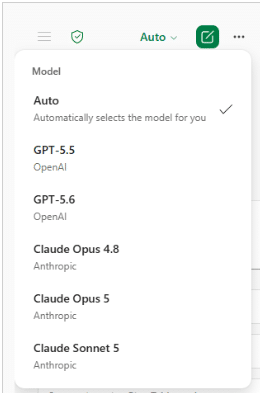
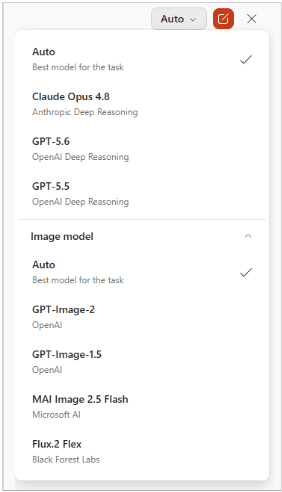
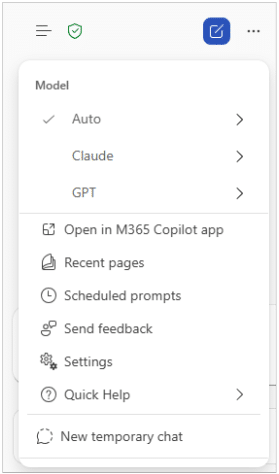
Sample model options from Excel, Powerpoint and Word.
For business users, this is a subtle but important shift. Copilot is not just a single assistant that gives one type of answer. It is becoming a flexible AI layer across Microsoft 365, where the user can decide whether the task calls for speed, depth or automatic routing.
For most day-to-day work, leave Copilot at Auto, but do not forget that you can change the approach when the task demands it. Quick responses are great for routine work. Deeper reasoning is better when the output needs more structure, accuracy or judgement.
As Microsoft continues to evolve Copilot across its apps, understanding model choice will become a practical skill for anyone using AI at work. For more updates check out the Microsoft 365 Copilot Blog: https://techcommunity.microsoft.com/category/microsoft365copilot/blog/microsoft365copilotblog
Contact our AI experts about how Microsoft Copilot (M365 Copilot Business) can be deployed with ease and how employees can increase their productivity in a secure environment.

An experienced Senior Microsoft 365 engineer, specializing in cloud services such as Intune, Entra/Azure as well Microsoft’s Security products. Cormac has years of experience protecting companies against Data breach’s or dealing with the aftermath and can help your company protect its data from attacks from both outside or within.



An experienced Senior Microsoft 365 engineer, specializing in cloud services such as Intune, Entra/Azure as well Microsoft's Security products. Cormac has years of experience protecting companies against Data breach's or dealing with the aftermath and can help your company protect its data from attacks from both outside or within.